Search This Blog

Showing posts with label fx702p. Show all posts

Wednesday, 24 February 2021

Casio FX-502P SD Card Gadget Prototype

 Casio FX-502P SD Card Gadget Prototype

A while back I made a gadget that attached to a Casio FX-502P via an FA-1 and stored programs and data on an SD card instead of a cassette . 

https://trochilidae.blogspot.com/2017/06/fx502p-cassette-interface.html

It decoded the frequencies that the FA-1 sent to a cassette recorder and wrote the data to an SD card attached to an Arduino Due. I had to use a Due as it was the only combination of  clock frequency and RAM that could keep up with the data stream coming out of the FA-1. 

The advantage of using this approach was that the cassette interface was a well-known format and fairly easy to decode. The disadvantage is the bulk of the final package. To get the data onto the tiny little SD card you need the FA-1 cradle and the gadget. A few weeks ago I suddenly realised that I could cut down on a lot of the hardware needed by attaching a gadget to the expansion port on the top of the FX-502P. This would involve interacting with the protocol that goes over the expansion port, but that shouldn't be a problem. There's a lot of detail here about the expansion port of the FX-602P and FX-700P.

As a base for a prototype I used the Sharp PC-G850 gadget, using the Blue Pill processor and the OLED display. The expansion port signals are attached to the 11 pin Sharp interface connector on the gadget using a cable.

The protocol that the expansion port uses is a bit odd. It seems to be the bus that the processor in the calculator uses to talk to the LCD controller. It has a single bi-directional  serial data line, a chip select, a command/data control line and a clock for the serial data. The data packets are of variable length, which makes it a bit hard to decode. Most packets are 6 bits long, there is one two bit packet and a 16 bit long data packet (holding an RS232 type character format that encodes a single byte of data. The clock edge that the data is latched on is different for transmitted and received data. And the data is inverted logic (0 is 3V and 1 is 0V, not forgetting that the calculator uses 3V as it's 'GND' and -3V as its VDD).

Once the signal levels are sorted (use 0 and 3V to power the STM32, invert data to get levels that match the known commands for the FX-602P) the data and clock can be fed to GPIO lines on the STM32, The bus runs at around 200kHz, so there's not a lot of time to process the packets. It is not feasible to have any delays so I run the decoding code purely in interrupts (one on the SP or clock line and one on the CE signal). The timing is so tight that initially I had problems with the serial port disabling interrupts (I presume that is what it was, disabling serial IO removed the problem), those problems went away with later code, but I can still disable the serial port access when packets are received.


The data that is sent and received is held in a RAM buffer, there is no time for access of the SD card, so the RAM buffer is stored and loaded from SD card when needed.

After quite a lot of reverse engineering of the interface (the FX-502P is not quite the same as the FX-602P) including capturing traces of communication between the calculator and an FA-1 adapter, I got some working code that could both send and receive data files from the calculator.

This gives a gateway between the calculator and the outside world. The calculator has a limited number of ways to send information over the interface. It can send or receive a single number (this is the quickest transfer), it can send or receive all memories

At this point the prototype was limiting the code as there isn't sufficient flash memory on a Blue Pill (STM32F103C8) to implement the features I wanted to add. The basic idea had been proven with the prototype, time to move on to a better platform. For that I chose the STM32F103RE device. Or, more accurately I chose the 64 pin QFP package. The STM32F103 family has nice pin compatible genetics, so several devices of different capacities will fit onto a particular footprint. Using the 64 pin QFP I can got up to 1M of flash and 96K of RAM down to 16K of flash and 6K of RAM. There's also a lot of GPIO on this package, way more than I need for this gadget.

It has a small 0.96" OLED display, an SD card module and a programming header that uses an STLINk V2. It also has a serial data header with TX and RX, and a header with 8 GPIOs on it (and power):


The PCB plugs into the connector on the top of the calculator. Optionally the PCB can supply power to the calculator, or it can run off batteries, there's a jumper for that. It's the red one. 

I have also used a USB socket breakout board for the USB connection, which supplies poiwer for the PCB and also provides a serial connection. I use a breakout board as the USB sockets have a habit of ripping off the PCBs and taking tracks with them. This way the tracks are on a disposable PCB, not the more valuable one. I've already replaced the USB socket and breakout board on the is PCB...

The code is based on the Arduino platform, so it can connect to the serial monitor of the IDE.

What can it do? Well, it can save and load programs and memories to and from the SD card, that's the basic function. It also uses several 'special' values to do other things. Things like displaying programs on the OLED display:


 With GPIO lines you can interface any I2C device, such as a real time clock. This is the STM32 displaying time in a display mode set up by the 502, using a DS3231 RTC module:

You can also read the time (and date) into calculator memories:


Of course, it is useful to be able to print things out now and again. Interfacing a simple thermal printer isn't difficult. The one I used accepts serial data so I attached it to the serial data header .The calculator can set up a print flag that sends programs and memories to the printer as well as SD card.


This printer does require a 2A supply, so can't run off the USB direct from the PCB.  


There was a printer that attached to the FX-502P, but it used magic metallised paper which is pretty much impossible to find these days, so a thermal paper option is a nice alternative. See here for more magic metallised paper experiments:

https://trochilidae.blogspot.com/2019/12/magic-metal-paper-in-seventies-casio.html
https://trochilidae.blogspot.com/2020/01/more-magic-metallised-paper-experiments.html

As well as the RTC, I've attached a sensor module and an accelerometer, but haven't done much with them other than read registers. There's also a text mode where the calculator has a text screen that it can place ASCII text on, and a graphics screen that it can place pixels on.

More information on these videos.


The gadget should work perfectly fine with an FX-501P, as it's the same code and hardware in the calculator as shown in this video:


The FX-602P and FX-601P use the same interface but a slightly different command set. It should be possible to get it to work, though, with some changes to the firmware on the gadget. 

The FX-702P tantalisingly uses the same connector as the 502/602 series calculators, and the same command set as the FX-602P, but unfortunately uses 5V signalling rather than the 3V of the 502/602. The pins used on the STM32 for the calculator interface are 5V tolerant, but there's a couple of issues. The first is that the STM32 should be able to sense the 5V logic levels correctly, but may have trouble driving 5V levels due to 5V tolerant pins still driving at 3V3. The second issue is that the data line is bi-directional and the 5V tolerance on STM32 devices only works when it is configured as an input. I have serial resistors on the calculator interface lines, which might help, but if there's a time when driving the interface that I drive the data line as an output and the calculator does the same then there could be problems. I may try this in the future, as it may work.


Wednesday, 26 February 2020

Bus Sniffing Replacement Display for Fx702p

I've had bad experiences with heat seal connectors in the past (Casio PB220) and wasn't very happy to find that a broken Casio fx-702p had a heat seal connection from its main PCB to the LCD. The display wasn't working and when I had a look at the connector it had broken tracks. After buying some conductive paint (water based carbon), I had a go at repairing the tracks. This was going well until I pulled the LCD end of the connector ribbon at one side and the connections to the LCD just ripped off. The ease with which this happened might have been a clue as to why the fixes I was doing with paint didn't seem to be affecting the bad display at all. It looks like the LCD connections were dodgy as well. Fixing the LCD end of the connections is not something I think I will have much success at, so I ripped the entire connector off.

This made repairing the device out of the question at the moment as I have no way to connect the LCD to the PCB. After a bit of thought I wondered about attaching a totally different display to the LCD connections and get display output that way. This is theoretically possible, but as the LCD signals are multi-level (essentially analogue) and there are a lot of them (dozens) it would be difficult to capture the data needed to rebuild the display. The decoding of the signals isn't trivial either.

So I had a bit of a think and decided that an easier way to get a display would be to attach a sniffer to the bus that the processor uses to talk to the display controllers. Then I could capture the data going to the display controllers and put that on an external display. The fx702p would not have it's original display but at least I'd be able to use it. Then I thought about what else was on the bus and it got even better. The RAM chips that give the 702p its memory are also on the bus, so I could snoop reads and writes to the RAM and have an idea about what the programs stored in the RAM looked like. And any other data in there. This was looking feasible and interesting.

After some wiring


 I had a logic analyser attached to the bus and I managed to capture bus traffic:


This actually shows the message that the 702p displays at power on. The bus is four bit, though, so you only get nibbles displayed, and the 702p doesn't use ASCII for it's characters. The values starting 1 5 in the photo are the sequence:

1 5 4 4 0 4 3 4 8 5 F 0 F 4

If you turn these into bytes (reversing each pair of nibbles) you get:

51 44 40 43 58 0F 4F

If you check out a 702p character set map (such as this one http://www.pisi.com.pl/piotr433/fx702cod.png) you will see that these character decode like this:

51 R
44 E
40 A
43 D
58 Y
0F (space)
4F P

This is obviously the start of the 'READY P0' message that is displayed at power on.

Interestingly, this appears to be data sent to the display controller. When the CE lines for the RAM chips are examined, there appears to be no access to the RAM chips at all at start up. It looks like initialisation of the memory is done within the internal memory of the processor.

The next step was to use a logic analyser to decode as much of the display data as I could and then display it on the LCD. The final sketch uses interrupts to handle the bus accesses to the two display controllers and the main loop of the code to display the data.

My logic analyser has a slow 9600 baud connection for dumping traces, so using it to capture bus traces was time consuming when I was transferring the data from the analyser to a PC. Because of this I created a build option for the sketch that captured traces very similar to my logic analyser trcaes in the ISR. These traces are then decoded by the main loop and the data is displayed from them. This leads to a fairly large (2 or 3 seconds) delay before data from the ISR is displaye don the LCD, and also sometimes causes a trace buffer overflow and loss of cycles. It's a lot faster when looking at bus cycles, though, as the serial port runs at 2Mbps.  In normal ISR mode I also dump display data over the serial port so whatever is displayed on the 702p is available as a serial data stream.

There's a video showing it working and some description here:


The connections inside the fx702p require some fiddly soldering, but several signals can be taken from test pads, which is easier than soldering to an IC pin (which some signals have to come from).


I connected the signals to the blue pill using a milled PCB which makes the wiring much simpler than point to point. The physical layout of the board and components was for ease of debug and there are logic analyser connectors which aren't necessary any more. The whole thing could probably be designed to be much more compact.

The fx702p is normally powered by two 2032 button cells, which poses a problem as that can give a maximum of 6V when fully charged. The blue pill is a 3V3 device with 5V tolerant inputs. I therefore power the fx702p from the 5V supply of the blue pill and make sure that all signals from the calculator are going to 5V tolerant pins. This keeps the signals from the fx702p within safe levels. The calculator seems to run it's circuitry at the battery supply voltage, there's no regulator.

The latest incarnation of the display uses a milled PCB to simplify the signal connection from the calculator to the processor. 

The arrangement could be shrunk down, this PCB was a breakout board and has connectors for logic analyser signals, and was definitely not designed to be compact. I don't think the new electronics would fit into the case of the fx702p very easily, and I haven't seen a display that would fit in the space left by the old one. A better layout could be done though, and I may do that now I have the code and hardware essentially working.

Some sample displays. This is the power on display:


The 8 BB is part of a debug display of the annunciator data.
This is the MODE 1 display:


And this is a calculation ready to be evaluated:


There's some extra annunciators on that last display


Saturday, 7 December 2019

Magic Metal Paper

In the seventies, Casio created the FP-10 printer for the fx-602p.


It could also be used on other calculators like the fx-502p and fx-702p. Like the ZX Spectrum printer it  was a spark printer that used metallised paper. This paper is no longer available, at least anywhere I can find. I managed to get a printer for a reasonable price, and it came with one roll of paper. The paper appears to be a layer of metal at the front (aluminium I assume), then a black layer of some kind and then a paper backing. The rolls are very narrow and only a couple of metres or so long. I only have one roll of paper so I decided to see if I could make some paper to use on the printer.

I measured the paper and got a figure of around 3 to 6 ohms per square (very rough measure).


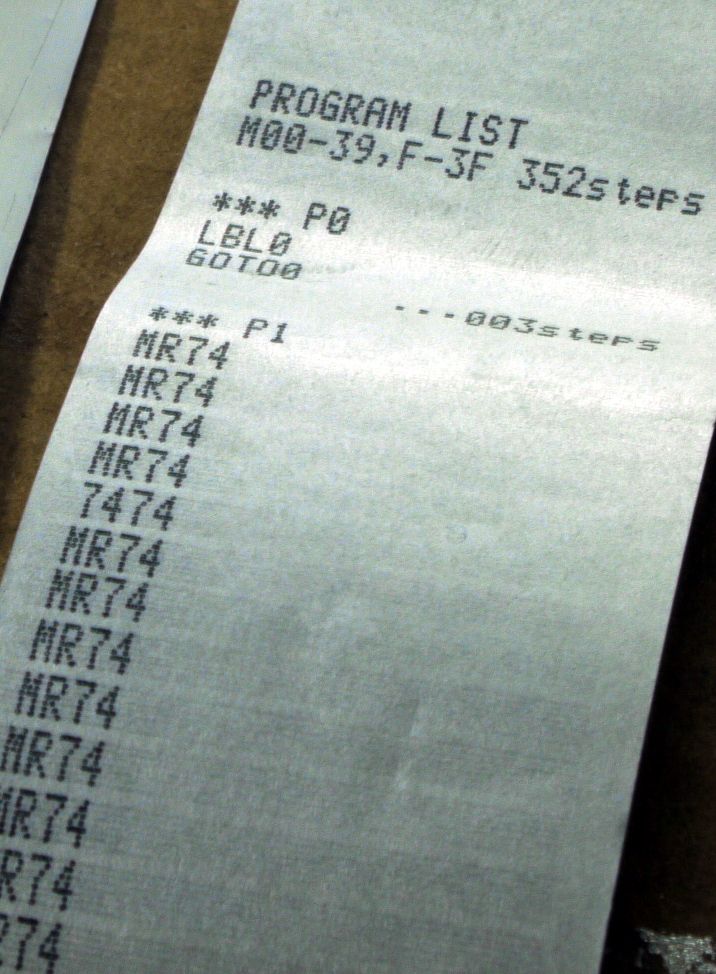
That's a printout from an fx502p, which doesn't ordinarily have any real alphanumeric capability, but the printout does. The printout is very clear.

Attempt One

Aluminium foil. I tried aluminium foil in the printer. This didn't work as the foil doesn't have the physical strength to get driven through the mechanism.

Attempt Two

Stiffen it up. I glued foil to paper to try to give it a bit of stiffness. This also didn't work. The foil tore and I suspect there was no electrical contact between the foil and the metal plate at the front that forms a circuit between the paper and the electronics.

Attempt Three

Try to find conductive paint to spray on some paper. There are conductive paints but they are very very expensive and I didn't try those. I also inquired about silver spray paint that looked like it was conductive. There's no metal in it apparently and it is not conductive.

Attempt Four

I find that there is a conductive paper available. It's called 'teledeltos' and it is used for science experiments and I believe was also used in fax machines many years ago. I bought some (not cheap) and it arrived as a large roll. It appears to be totally unsuitable as it is carbon based and the conductive side of the paper is the wrong side to work in the printer. The resistance of this paper is probably too high anyway at 2000-3000 ohms.


The black side is conductive, but you'd want to print on the white, non conductive side to get contrast. I tried scraping some of the white off so there's contact with the metal plate on the front of the printer, but no sparks at all. 


Attempt Five

I tried shiny aluminiumized paper based on a plastic sheet backing. This was conductive on one side but again wouldn't print.

Attempt Six

This involved aluminium 'gilding' foil. This is very thin foil that you can glue to paper (or other surfaces). It results in a shiny silvery effect. I used spray glue to attach the foil to paper as it will not adhere on it's own.


When I measured the gilded paper I got a figure around 0-1 ohms so this is much more in the ball park of the original paper. When I cut strips and ran them through the printer, there were some sparks, but not enough to get a printout.


 I'm not sure why not as the resistance seems similar to the original paper. The texture is different though, with the original paper a grey matt surface and the gilded paper much shinier.

Here's a selection of papers that I tried:


That's gilded paper on the left, shiny aluminiumized paper in the middle and the magic original paper on the right.

I also cut some original paper at a shallow angle so the layers become more apparent:


You can see the backing layer of paper, then a black layer and finally the aluminium on top. The black provides a contrast after the metal has been sparked away, I think.


Conclusion

There must be some magic employed in the original paper. It's not just that it is conductive, as none of these conductive 'papers' worked at all. The things I can think of are maybe:


  • The resistance of the paper is critical to operation. None of the resistances were exactly what the original paper showed, either much higher or slightly lower.
  • The texture of the paper is important. The original paper has a distinctive matt finish. If you scratch it with your fingernail then you get a metallic shine, so there's aluminium there.
  • The thickness of the paper is critical. I doubt the papers I made are exactly the same thickness as the original.
  • The printer has been finely tuned to print on just the original paper. maybe it can be re-tuned to print on other 'papers'.
I'm not sure what to do next. I may have a look inside the printer and see if there's some clues in there.