Search This Blog

Showing posts with label arduino. Show all posts

Thursday, 25 March 2021

 Using a Thermal Printer Mechanism

 Using a Thermal Printer Mechanism

The Casio CP-10 is a neat calculator that has a thermal printer attached. The calculator also has a built-in clock and can do useful tasks such as printing this month's calendar. The date range is also useful as it ends in 2099. The printer is a small mechanism that take standard 38mm thermal paper. I found out that the mechanism is the same one that the FP-12 printer uses. This is a small printer that is designed to attach to a variety of calculators and pocket computers.

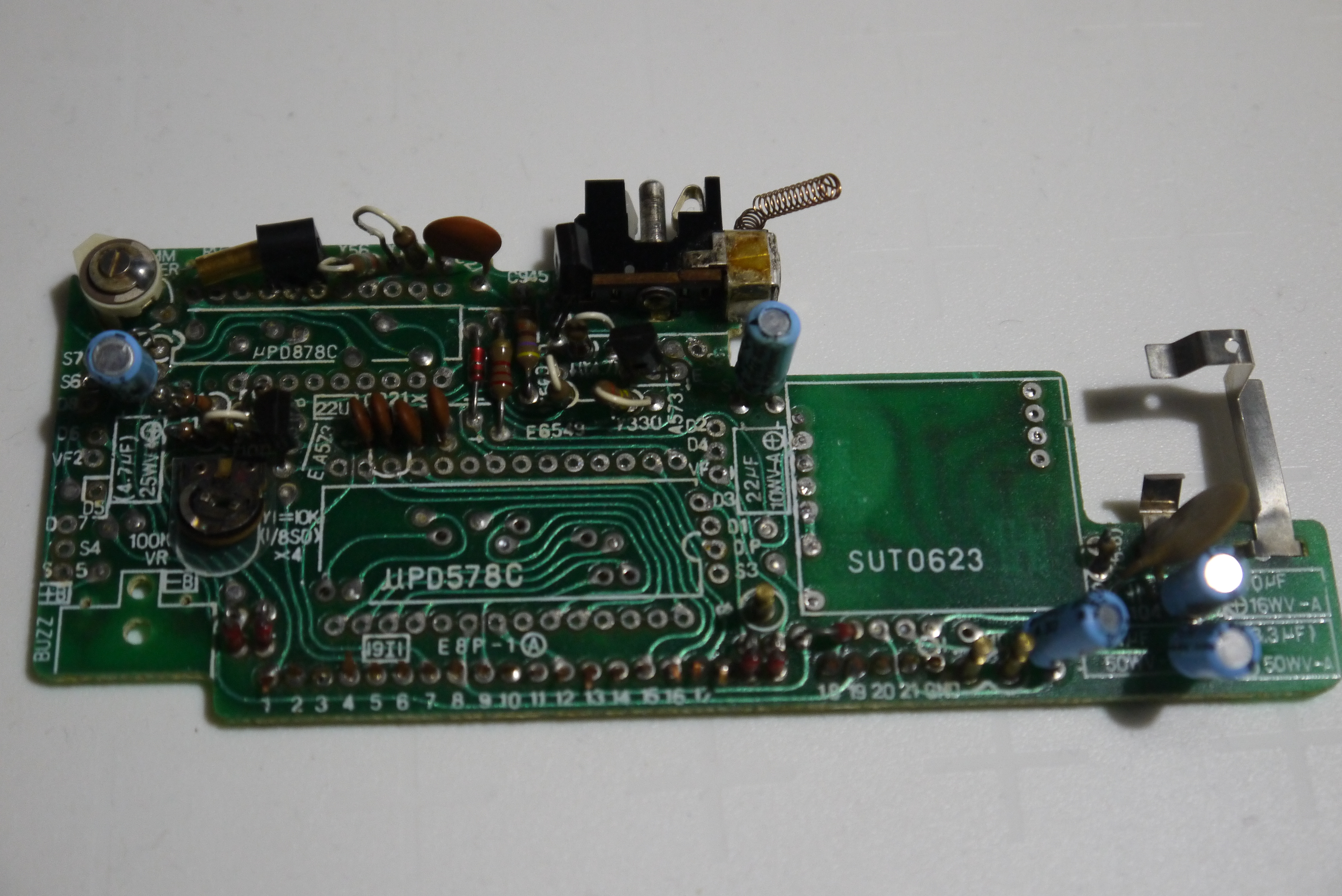
I bought a CP-10 to see if I could re-use the printer mechanism instead of the receipt printers that I have bought off ebay in the past. They are relatively expensive (over £20) whereas the CP-10 can be had for half the price, if the CP-10 is listed as non-working. Unfortunately the CP-10 has a NiCd battery pack, as the printer mechanism take a fair current when running and the pack is used to supply that. This means that a lot of CP-10s have suffered battery leakage and failed. This is what had happened to my example. After a brief attempt to revive it I cut off the printer mechanism and attached a blue pill and some extra circuitry.


There's seven transistors, one for each thermal element, and one transistor that drives the motor. There's an input for the home position switch as well. The mechanism has a tachometer output that gives a series of pulses as a magnet rotates near a coil. The magnet is attached to the motor, so this arrangement gives a reading of the motor speed. The pulse may also be used for dot timing. Unfortunately my mechanism seems to have a broken tachometer output. The coil reads 25M resistance, which is a bit high for a coil of wire. (I have since bought a second CP-10, this one shows signs of life and its coil reads 82R, so is much healthier). After trying my own tacho circuit, then copying the CP-10 circuit, then building a higher gain circuit with an op-amp I decided that the tacho output wasn't reliable enough to use. This may not be too much of a problem if the motor is run off a stable supply as the speed of the motor should be fixed. I should be able to time the motor moving from home position back to home position and scale the dot timings appropriately if need be.

The output from my working CP-10 is like this:


That's the calendar printout from the CP-10. The FP-12 has a print width of 20 characters, the CP-10 also seems to have a print width of 20 characters.

My first attempt at printing was a little more basic than a calculator. I turned the motor on and fired one element of the print head repeatedly:


This is a start, at least I'm getting dots. The motor drive also performs line feeds and the dots show that. The horizontal dots are the feed across the paper. the sloping dots are where the head is returning and the paper is being fed. After some work with the code, including adding a font table and using the input from the home switch, this is the output:


This is a test printout that is printing the parameters of the code that printed that section. I am also using 20 characters as the width here, simply because the mechanism is set up for it. There's a row at the top of the characters that is faint, I think this is to do with the ground wiring I have used.

There is also an interesting effect which is best shown in the lines of asterisks. They are darker on the right hand side of the line. I'm pretty sure this is down to the heating of the printhead as elements are turned on. Every time a dot is printed, the printhead warms up a bit. This means that to get an equivalent dot, you don't need to turn the element on quite as long the next time. In the printout above, I have a parameter called 'DEC_PERIOD' which controls part of my correction for this thermal heating effect. You can see that the second from bottom section has a DEC_PERIOD of 1 and the asterisks are darker to the right hand side of the line. The section above it has a DEC_PERIOD of 2 and the asterisks are printed more evenly.  The correction code counts the number of elements that have fired, accumulates those counts and uses them to create a 'temperature' for the printhead.  The DEC_PERIOD value controls the cooling of the printhead. This does lead to a working correction as can be seen above.

I think the CP-10 code must also be doing something similar, as the calendar printouts above show an even darkness across all the lines.

The CP-10 must also be correcting for supply voltage variations. It runs off four NiCd cells which will present a range of voltages to the motor and hence different speeds of printing. I have attached my working CP-10 to a power supply and varied the voltage. The time to print a line definitely changes, but the characters printed remain in the correct positions. The printout is fainter when the voltage is lower. The code could be using the tachometer signals from the mechanism. I can't do this but I could measure the time taken to print a blank line and use that to adjust the dot timings. Interestingly it appears that the CP-10 does print one blank line after it is powered on. I wonder if that is a timing line and the CP-10 is doing what I will probably have to do if I want to correct for voltage?

Next step? probably a PCB. But do I use a blue pill or STM32 chip? Given the size of the mechanism, a blue pill is a bit on the big side, so I think a chip would be better. The only problem is that there is quite a shortage of STM32s at the moment. I've got a few so that is probably OK.

There's a video here of the prototype:


Wednesday, 24 February 2021

Casio FX-502P SD Card Gadget Prototype

 Casio FX-502P SD Card Gadget Prototype

A while back I made a gadget that attached to a Casio FX-502P via an FA-1 and stored programs and data on an SD card instead of a cassette . 

https://trochilidae.blogspot.com/2017/06/fx502p-cassette-interface.html

It decoded the frequencies that the FA-1 sent to a cassette recorder and wrote the data to an SD card attached to an Arduino Due. I had to use a Due as it was the only combination of  clock frequency and RAM that could keep up with the data stream coming out of the FA-1. 

The advantage of using this approach was that the cassette interface was a well-known format and fairly easy to decode. The disadvantage is the bulk of the final package. To get the data onto the tiny little SD card you need the FA-1 cradle and the gadget. A few weeks ago I suddenly realised that I could cut down on a lot of the hardware needed by attaching a gadget to the expansion port on the top of the FX-502P. This would involve interacting with the protocol that goes over the expansion port, but that shouldn't be a problem. There's a lot of detail here about the expansion port of the FX-602P and FX-700P.

As a base for a prototype I used the Sharp PC-G850 gadget, using the Blue Pill processor and the OLED display. The expansion port signals are attached to the 11 pin Sharp interface connector on the gadget using a cable.

The protocol that the expansion port uses is a bit odd. It seems to be the bus that the processor in the calculator uses to talk to the LCD controller. It has a single bi-directional  serial data line, a chip select, a command/data control line and a clock for the serial data. The data packets are of variable length, which makes it a bit hard to decode. Most packets are 6 bits long, there is one two bit packet and a 16 bit long data packet (holding an RS232 type character format that encodes a single byte of data. The clock edge that the data is latched on is different for transmitted and received data. And the data is inverted logic (0 is 3V and 1 is 0V, not forgetting that the calculator uses 3V as it's 'GND' and -3V as its VDD).

Once the signal levels are sorted (use 0 and 3V to power the STM32, invert data to get levels that match the known commands for the FX-602P) the data and clock can be fed to GPIO lines on the STM32, The bus runs at around 200kHz, so there's not a lot of time to process the packets. It is not feasible to have any delays so I run the decoding code purely in interrupts (one on the SP or clock line and one on the CE signal). The timing is so tight that initially I had problems with the serial port disabling interrupts (I presume that is what it was, disabling serial IO removed the problem), those problems went away with later code, but I can still disable the serial port access when packets are received.


The data that is sent and received is held in a RAM buffer, there is no time for access of the SD card, so the RAM buffer is stored and loaded from SD card when needed.

After quite a lot of reverse engineering of the interface (the FX-502P is not quite the same as the FX-602P) including capturing traces of communication between the calculator and an FA-1 adapter, I got some working code that could both send and receive data files from the calculator.

This gives a gateway between the calculator and the outside world. The calculator has a limited number of ways to send information over the interface. It can send or receive a single number (this is the quickest transfer), it can send or receive all memories

At this point the prototype was limiting the code as there isn't sufficient flash memory on a Blue Pill (STM32F103C8) to implement the features I wanted to add. The basic idea had been proven with the prototype, time to move on to a better platform. For that I chose the STM32F103RE device. Or, more accurately I chose the 64 pin QFP package. The STM32F103 family has nice pin compatible genetics, so several devices of different capacities will fit onto a particular footprint. Using the 64 pin QFP I can got up to 1M of flash and 96K of RAM down to 16K of flash and 6K of RAM. There's also a lot of GPIO on this package, way more than I need for this gadget.

It has a small 0.96" OLED display, an SD card module and a programming header that uses an STLINk V2. It also has a serial data header with TX and RX, and a header with 8 GPIOs on it (and power):


The PCB plugs into the connector on the top of the calculator. Optionally the PCB can supply power to the calculator, or it can run off batteries, there's a jumper for that. It's the red one. 

I have also used a USB socket breakout board for the USB connection, which supplies poiwer for the PCB and also provides a serial connection. I use a breakout board as the USB sockets have a habit of ripping off the PCBs and taking tracks with them. This way the tracks are on a disposable PCB, not the more valuable one. I've already replaced the USB socket and breakout board on the is PCB...

The code is based on the Arduino platform, so it can connect to the serial monitor of the IDE.

What can it do? Well, it can save and load programs and memories to and from the SD card, that's the basic function. It also uses several 'special' values to do other things. Things like displaying programs on the OLED display:


 With GPIO lines you can interface any I2C device, such as a real time clock. This is the STM32 displaying time in a display mode set up by the 502, using a DS3231 RTC module:

You can also read the time (and date) into calculator memories:


Of course, it is useful to be able to print things out now and again. Interfacing a simple thermal printer isn't difficult. The one I used accepts serial data so I attached it to the serial data header .The calculator can set up a print flag that sends programs and memories to the printer as well as SD card.


This printer does require a 2A supply, so can't run off the USB direct from the PCB.  


There was a printer that attached to the FX-502P, but it used magic metallised paper which is pretty much impossible to find these days, so a thermal paper option is a nice alternative. See here for more magic metallised paper experiments:

https://trochilidae.blogspot.com/2019/12/magic-metal-paper-in-seventies-casio.html
https://trochilidae.blogspot.com/2020/01/more-magic-metallised-paper-experiments.html

As well as the RTC, I've attached a sensor module and an accelerometer, but haven't done much with them other than read registers. There's also a text mode where the calculator has a text screen that it can place ASCII text on, and a graphics screen that it can place pixels on.

More information on these videos.


The gadget should work perfectly fine with an FX-501P, as it's the same code and hardware in the calculator as shown in this video:


The FX-602P and FX-601P use the same interface but a slightly different command set. It should be possible to get it to work, though, with some changes to the firmware on the gadget. 

The FX-702P tantalisingly uses the same connector as the 502/602 series calculators, and the same command set as the FX-602P, but unfortunately uses 5V signalling rather than the 3V of the 502/602. The pins used on the STM32 for the calculator interface are 5V tolerant, but there's a couple of issues. The first is that the STM32 should be able to sense the 5V logic levels correctly, but may have trouble driving 5V levels due to 5V tolerant pins still driving at 3V3. The second issue is that the data line is bi-directional and the 5V tolerance on STM32 devices only works when it is configured as an input. I have serial resistors on the calculator interface lines, which might help, but if there's a time when driving the interface that I drive the data line as an output and the calculator does the same then there could be problems. I may try this in the future, as it may work.


Thursday, 24 December 2020

Casio CQ-1 Recreation Information

Until I tidy up the github repository, here's some snippets relating to the Casio CQ-1 recreation.

 The first PCB is really a prototype as well, it just fits in the case better than the first prototype. 

Saturday, 12 September 2020

Casio CQ-1

 Casio CQ-1

A long time ago, I had a Casio CQ-1. 


It was a weird machine, I suppose, but it was a clock, and a stopwatch, and a calculator, which makes it pretty useful. And the calculator could tell you what day of the week any date was (well, in it's date range). It could calculate the number of days between two dates. And it was an alarm clock.

Not so long ago the batteries leaked and the CQ-1 was binned. This was a shame and I decided to get hold of another one, so bought one on ebay. This didn't turn out too well, as the device would only start up if I held my finger on one of the clock oscillator pins. I tried simulating a finger with various components, but the little chip seemed only happy with my finger. I never found out why, so I bought another CQ-1, hoping to either get enough bits to fix my original CQ-1 or get a unit I could fix. That didn't work out too well either, as it was utterly dead, and no amount of fingering could get it going again.  Aargh!. Third unit and this time all was well. It calculated dates and the stopwatch worked.

At least all was well until I came to use it after a day or two and the AA battery was flat. Aaargh! again. This CQ-1 has a strange fault where the supply that powers the VFD display seems to power up repeatedly even when the unit is off, and that eventually flattens the battery.

So, I decided to have a go at designing a replacement for the CQ-1 main PCB. This is the one that has the circuitry on it. This is a partially stripped PCB:

It attaches to a keyboard PCB which has one of the AA battery connections on it. The wire tabs connect to two 1.5V watch batteries that power the clock circuit. 

The first attempt at recreation is this:


There's a prototyping PCB (one of Mike Harrison's prototyping boards) with all the circuitry to create the voltages to run the ARM processor (3V3)and the higher voltage needed to run the VFD segments and digits (about 23V). The filament drive is conveniently 3V3 (ac). The PCB is attached to the front half of a CQ-1 which provides the switches and keys. All this circuitry runs off a single AA battery, or USB. As batteries are an evil that has to be tolerated, I did consider running this off just USB, but decided that it was too limiting. i didn't want to use the original CQ-1 PSU as I've never seen one, and USB is just so convenient. I haven't carried over the silver oxide batteries that run the clock, instead the RTC chip runs directly off the battery. It is a low power chip so that's not a problem. If there's 3V3 then it runs off that too, so you can plug a USB cable in when changing the AA battery.

This is a close up of the prototype PCB.


There's a blue pill providing an ARM processor, programmed with an ST-LINK. There's two dc-dc converters, one to go from 1V5 to 3V3 and one to go from 3V3 to 23V (-ish). The 23V supply is switchable from the processor and turns the display on and off. The VFD is driven from a MAX6921 chip which has a serial connection to the processor. The timekeeping is provided by an MCP7940 chip with it's own crystal. This is attached over I2C to the processor. i took a VFD tube from a donor CQ-1 and that is used as the display. The beeper is also from a CQ-1. Due to the STM32F103C8 on the blue pill not having enough GPIOs to handle all this hardware and scan the keypad, a GPIO expander is used on this PCB to provide more GPIOs. This is accessed using I2C.

Of course, this doesn't fit in the original case, so a V2.0 PCB has been created that does:

This is basically the same circuit, but the dc-dc converters are now in component form on the PCB, and the GPIO expander has been dropped as a larger STM32 chip with more GPIOs has been used. This is capable of all the IO and keypad scanning. It also has more flash and RAM (512K of flash and 64K of RAM). As the STM32F103 chips are all very compatible there are a few options for flash and RAM simply by fitting a different variant of the chip.

I've also added the connections for an OLED display on this PCB so if the CQ-1 VFD is broken then you can use a dot matrix OLED display. The 23V dc-dc converter can be left out if the OLED is used, as well.

Here's the first populated PCB in a case:

It fits nicely, the wires coming out are the ST-LINK programmer wires. The USB power goes in through the battery cover latch hole which I filed out so the USB socket was accessible. The circuit should run off a single AA battery as well (the prototype did, but I've not tested the new PCB yet). I'll need to print a connector for the positive terminal of the battery, the negative is a spring on the keypad PCB.

Here's the front side of the PCB:


Again the beeper and VFD tube are from a CQ-1. The keypad PCB is mounted using 0.1" plug and socket connectors, the spacing was perfect, even though the original CQ-1 uses copper strips held together with plastic.

The PCB needs a modification as I got one signal wrong, the keypad connector is out by 0.1" for five connections, the 23V dc-dc converter inductor whistles, and the mounting hole for the beeper is too small, but other than that I'm very happy with it. It fits the case well.

There's a few things left to do. The display is a bit dim, which is probably the 23V dc-dc converter needing to be 26V or so. There's a lot of code to write if this is going to be the same as a CQ-1 but there's a rudimentary stopwatch and integer-only calculator, together with a clock you can't set, but writing the code is the fun bit...

See it working here:


Some pictures of it operating:


The USB cable that is powering it and the programming wires that come off a header on the PCB:


And displaying some characters that the original just can't manage:


Tuesday, 19 May 2020

Inductor, Capacitor, Resistor and ... Memristor

Inductor, Capacitor, Resistor and ... Memristor

You can easily buy resistors, capacitors and inductors, they are the building blocks of electronic circuits everywhere. Now you can buy the fourth, a less well-known fundamental device: the memristor. This is a device whose resistance changes depending on the current that has flowed through it. There's a Wikipedia page with details here:

https://en.wikipedia.org/wiki/Memristor

You can buy them here: Knowm

I decided to by some to experiment with. Knowm have a variety of packages for their memristors, I chose the 32 pin DIP style package:


I bought three different types of memristor: Tungsten, Carbon and Chromium. The photo is a Tungsten variant. There's 16 memristors in the package. Here's a close up of what's in the package:


The dark bars are, I think, the memristor channels that change their resistance depending on the current through them. The silver blobs are bond wires that provide connections from the memristors to the pins on the package. The collection of memristors is then encased in a blob of transparent plastic of some kind. The blob seems to be permanently a bit tacky, hence the blobs of dust in the picture.

I have no application for these devices, indeed very few people do, so I decided to build a test rig to investigate what their characteristics are. This is based on an Arduino Uno, together with some analogue switches to select memristors to test, a DAC to drive test voltages and a voltage reference. The AD converters on the Uno are used to measure the voltages across the memristor.


I made a test package in the same form factor as the memristors, which I populated with a collection of diodes, resistors and other components so I had a known set of reference devices to compare to the memristors.


The two analogue switch ICs are on perfboard because I got the width of the ICs incorrect, so I made adapters rather than re-spin the PCB.  Unfortunately the memristor package is a different width to the 40 pin DIP footprint I put on the PCB so they have to plug in to the PCB using a perfboard adapter as well. This also means the test component PCBs are a different width to the memristor package. Oh well, it was a quick PCB layout job, and it is a prototype after all.

The software on the Uno drives a voltage across the memristor and a current limiting resistor and measures the current and voltage through the test component. I then put the values that are output on the serial port into a spreadsheet and plot the result. Here's the output from a run with a resistor:


The straight line indicates a constant resistance, in this case 10k. If the same test is run on a diode then you get this:


The rise in current is the diode turning on. The current doesn't go very high as the memristors I am using cannot tolerate more than 1mA of current. In fact they are supplied with a warning sheet which lets you know that probing them with a multimeter will destroy the devices due to too high a voltage being applied to them. The PCB has a series resistor to limit the current, with the value I am using this is a limit of about 200uA. The forward voltage drop of a diode is about 600mV, but this isn't reached in the graph above as the current is limited.

A 2V0 zener diode results in this trace:


The forward voltage threshold is similar to the diode above, but the reverse voltage threshold is higher and the current increases at a slower rate than the forward current increase. At higher currents this reverse voltage would be 2.0V for this diode.

I had a few false starts when I tried to trace a memristor. The curves just didn't come out as expected, here's an example:


The units are current in uA vertically and voltage in V horizontally. The curve isn't what is expected of a memristor which should be a bow-tie sort of shape with a 'pinch' in it. I had designed the PCB with the datasheet in such a way that I didn't exceed the maximum ratings for current or voltage. The datasheet was a bit inconsistent and had several VI curves that didn't have explicit units for current or voltage. If they were volts and amps, then the curves would extend past the maximum ratings of the memristors. After talking to Knowm it turns out that the maximum ratings (mainly for current) are simply a threshold where the high resistance state turns into a lower 'high resistance'. The drop is from around 1Gohm to about 100kohm. The curves in the datasheet do indeed exceed the maximum values given. In light of this I changed the current limiting resistor from 100k to 1k, which allows a much higher current to be supplied. With this resistor a typical curve from a memristor is like this:


This curve has the expected form for a memristor, with the crossover and hysteresis. It's a quasi d.c. curve so doesn't look like the trace most often seen which is one made with sinusoidal drive signals. Before I increased the drive current I did put together a sinusoidal drive circuit to see if I could duplicate the waveforms I had seen, and got this:


This does look like the traces I had seen, so it proved that the memristors were in fact still memristors and I hadn't damaged them. The quasi d.c. traces are similar to these but are slightly different in shape. Memristor traces alter depending on the frequency that they are driven at so this isn't unexpected.

This plot of all of my Tungsten memristors shows a problem with this device:


This shows that the memristors are pretty similar when a positive voltage is applied. When the voltage is negative, however, then some of the devices behave very differently. This makes it tricky to use them as memory storage. This is the curve of a single tungsten memristor. It shows (to the right) the low resistance region, as current increases when voltage increases. To the left the low resistance persists until a threshold is reached, then the current drops as voltage increases. This is a negative resistance area, the device then enters the high resistance area.


This transition area as the device enters the high resistance region is where a lot of variation occurs. If you are trying to represent a '1' bit as the device being in the low resistance region and a '0' bit as the device being in the high resistance region then you can have problems because of this variability. This makes it difficult to use the memristors to store bits (I've tried), something which simulated memristors don't suffer from.


Thursday, 23 April 2020

Water Level Monitor

Water Level Monitor

We've got a rainwater harvesting system that consists of a tank holding rainwater and a pump that supplies toilets and the washing machine. The system came with a mechanical water level meter which is fine, but it requires a trip to a cupboard and some hand pumping. The pumping creates high pressure air which runs in a pipe to the tank. The higher the water level in the tank, the higher the pressure. A pressure gauge in the meter shows the capacity in percentage capacity.

The reading is the height of water in the cylindrical tank. As the cross section of the tank is circular this doesn't quite represent the amount of water in the tank, but it's fairly close.

I started looking at an electrical version a few years ago. Using a pump instead of the mechanical hand operated piston was an obvious way to do this.You could then have a pressure sensor which gives you the same reading as the mechanical system.

The first problem was the pressure involved. The tank is about a meter and a half high and that leads to quite a pressure. The pump needs to generate at least this pressure and the pressure sensor needs to be able to read that pressure. I couldn't find either a pump or a pressure sensor that would work at the pressure I needed.

I left the project for a while, then I came across a cheap blood pressure monitor. This has a pump and a pressure sensor and performs a very similar task to the water level meter I wanted to create. The pressures involved looked promising as well. I dismantled the monitor and extracted the pressure sensor and pump. I reverse engineered the circuit for the sensor and recreated it on an arduino Uno format shield.


You can see the sensor below the IC, it attaches to plastic tubing.The pump drive is a power transistor driven with a PWM signal so I have speed control. If the pump is driven at full speed then it is a bit noisy. Running at a lower speed still gives a high enough air pressure and it's much much quieter.

The final system is mounted in the same cupboard next to the manual meter:


The electronics are in a 3D printed case,  the pump is on 3D printed brackets. The manual meter reads the air pressure when the pump is energised, so you can use it instead of the manual pumping system.

The manual pumping system (below the electronic system) still works exactly as it did before, so there's a backup in case the electronics fails.

The code is set up to energise the pump once an hour, it then stores up to 1000 samples which are offloaded to my laptop using a cron job. I can then graph the samples as needed.


Saturday, 4 April 2020

Dehydrator Update

Dehydrator Update

It was time for an update to a couple aspects of the dehydrator. Firstly, the trays I made to hold the stuff to be dried needed to be replaced. they were wooden and had warped really badly:


The replacement is a metal rod and 3D printed tray which hopefully won't warp. It also has a handle in the middle of the tray so lowering it into the dehydrator is going to be a lot easier.

Whatever is being dehydrated sits on a plastic mesh so that air flows easily through the trays:


The trays look a lot better than the wooden ones and I hope they will work a lot better as well.

The second update is an engraved front panel.


Which potentiometer controls what is now obvious, as is the function of the LED. This is engraved white on black plastic sheet. I need to make some nice knobs for the pots next...


Saturday, 21 December 2019

Z80 Arduino Using Mega as Debugger

Z80 Arduino Using Mega as Debugger

Ever since the 80's I've wanted to build a Z80 computer. I even bought the chips, but never used them. The reasons for this are varied. I never liked erasing and reprogramming EPROMs. My EPROM eraser died. I didn't have the money to make a PCB, or the software (or red and blue tape and a lightbox). In the 90's I did make a 6502 computer which was done with loads of wires on veroboard. Then the Arduinos came along and I didn't really need a Z80 computer as much.

I still wanted one though.

Then, in a flash, the scratch to my itch appeared: Why not make a Z80 computer with flash memory? Well, fine, but how do you program the flash memory? Aha! Why not use an Arduino to take over the bus and program the flash chip?

That should work, and once I had the idea of an Arduino to program the flash, it didn't take too long to think about using an Arduino to drive the Z80 clock and bus signals and provide flash data directly itself. This allows you to run the Z80 using the Arduino and read all the bus signals. You can single step your code at the resolution of a half T state (one clock transition). Once you are happy with your code, it can be burnt into flash. Once there, you can remove the debugger Arduino and use the board as a stand alone computer.

Of course, without IO and hardware bits attached to it, a computer like this isn't very interesting. So I added a couple of Z80 PIOs and the footprint for an Arduino shield. So you can plug shields in to the board and use whatever is on them. So you have a Z80 Arduino. Programmed in Z80 assembly (or C, or whatever you can get running on a Z80).

PCB manufacture is a lot cheaper these days so I had a few PCBs made up.
The board looks like this:


It is technically an Arduino shield as it plugs into the top of a Mega. It is also an Arduino itself, as shields (Uno format) plug into it. You run it either under Mega control where the Mega clocks the Z80 and emulates flash (the RAM is switched in as the mega runs the Z80, so you have 32K of RAM, more than the Mega can supply). Or you run it at 4.5MHz from the real hardware (with the Mega plugged in or not).

The specs aren't too bad either, there's 32K of SRAM and 512K of flash. The flash is bank switched, but needs a small piece of code in each bank at the reset vector. The Z80 runs at 4.5MHz.

The two PIOs have 32 GPIOs, each of which is bit addressable as input or output. I also put a Z80 CTC on there for timing things. This PCB uses through hole components apart from the flash chip, a 3V3 regulator and an A/D converter. There's some surface mount capacitors too. It's pretty easy to build, but does come out larger than an Uno, or Mega.

The mega plugs in underneath:


 The shield plugs in on top:


Under the shield there's an A/D converter that provides the analogue channels when operating as an Arduino. There's also a 3V3 regulator, just in case:


There's various test code in the sketch. This code writes to the LCD on the LCD/button shield:


I've got a script that embeds Z80 .lst file output into the Arduino sketch so you don't have to manually edit the file, you assemble it then run the script and it's put into your sketch which you then compile.

I've written a terminal emulator script that lets you upload .ihx files that have been built using the Z88SDK C compiler. The terminal emulator also has a register dump facility. This uses a small piece of code that is executed between each instruction when the Z80 is being clocked by the Mega. This code dumps the register contents in a non-disruptive way and the data is picked up by the terminal emulator and displayed.

This is very much a work in progress, but that's part of the fun isn't it?

The files are here on github, there's all the code and the PCB files. I use geda.

The PCBs I made are on Dirty PCBs here:

https://dirtypcbs.com/store/designer/details/9818/6402/z80-arduino-shield

A quick video of the shield:


Friday, 23 June 2017

Fx502p Cassette Interface

Fx502P Cassette Interface

The Casio fx502p is an old calculator. It is from the 80s which was a time when the cassette recorder was more common that it is these days, and it was used for non volatile storage on devices like this. I have a couple of these calculators, but I don't have a cassette recorder any more, and I really would like to have a better way to store programs than a cassette tape.

So, the MK I cassette interface based on an Arduino Uno:


This breadboarded circuit was capable of reading a cassette file sent by the calculator and then sending that same file back again. The output from the cassette interface is a microphone signal of about 10mV so there's an amplifier stage to get the signal to a logic level. This breadboard proof of concept worked well, so I made a PCB version of the amplifier circuit.


The Arduino Uno is just fast enough to handle the signals from the fx502P, which are 2400Hz and 1200Hz pulses, but I wanted to try to get this circuit working with calculators and computers that use faster signals, so I replaced the Uno with a Due which is a much faster processor. It also has more flash memory and RAM so I can add the SD card interface to the Due and have enough flash and RAM space left over to cache programs received over the interface.

The SD card interface was integrated with the amplifier on a shield:


The trimmers are used to adjust the gain of the amplifier stages and also the final threshold level on the comparator stage that is used to generate the final pulses .

The control of the card is currently done using the arduino serial interface. There's a set of commands that can be sent to do things, like send the current RAM buffer back to the calculator.

This is a program file sent from the fx502P:
This can be written to SD card and then read on a PC. You can also alter the program or data on the Arduino and send that back to the calculator. In this way you can get access to program instructions it is impossible to access from the keyboard, or the alphanumeric characters that, in the case of the fx502p can only be accessed with a sequence of keystrokes.

This is the fx502P receiving a program from the arduino:


Here I have sent the memories in one fx502p, modified them to give alphanumeric characters and sent the modified memory data to a second fx502P, you can see them on the calculator on the right.


 Next, I need to add a few commands to the code to read files from SD card and also see what other calculators and computers I can get to work with the interface.
I also added code that used the bottom bit of the file number to turn the Arduino LED on if the bit is 1 and off if it is 0. This is a single bit output port. It would be very feasible to assign input and output ports to one of the memories of the calculator (perhaps just for a particular file number). This would allow the calculator to control external hardware and read sensors etc. You could also attach an I2C port to the calculator with some extra code. I'll try this as well.